VirtoMir: An Honest Technical Teardown of a Hobby Project
How VirtoMir, my web panel for KVM/libvirt, works inside, what it does and doesn't do, how it was built with AI agents, and why it still needs other people's eyes.
Türkçe sürüm: VirtoMir: Bir Hobi Projesinin Dürüst Teknik Dökümü
1. Introduction
VirtoMir is a web control panel for KVM / QEMU / libvirt that I wrote. It installs on an existing Linux server as a single binary. It needs no dedicated distribution, no database and no agents inside the virtual machines.
This post is not a sales pitch. There are many projects like this, and some of them are far more mature than VirtoMir. What I want to cover is:
- how VirtoMir actually works inside,
- what it does and what it doesn’t,
- how it was built (short answer: one person and AI coding agents),
- and why it needs other people to test it, criticise it and read its code.
A few things up front:
- Version 0.9 is an early release. It has been tested on Ubuntu 26.04 on single hosts and small clusters. Many features have never run on real hardware. I list which ones below.
- The project grew very fast. The first commit on GitHub is dated 12 October 2026, and v0.9.0 is dated 19 October 2026. In that time about 96k lines of Go (35k of them tests) and 46k lines of Svelte/TypeScript were written. That pace was only possible with AI agents, and it means the code should not be judged like code a person wrote line by line and matured over years.
- Active development is paused for a while. Issues and pull requests are welcome, but answers may take a while.
Test it before you trust it with production. I mean that literally.
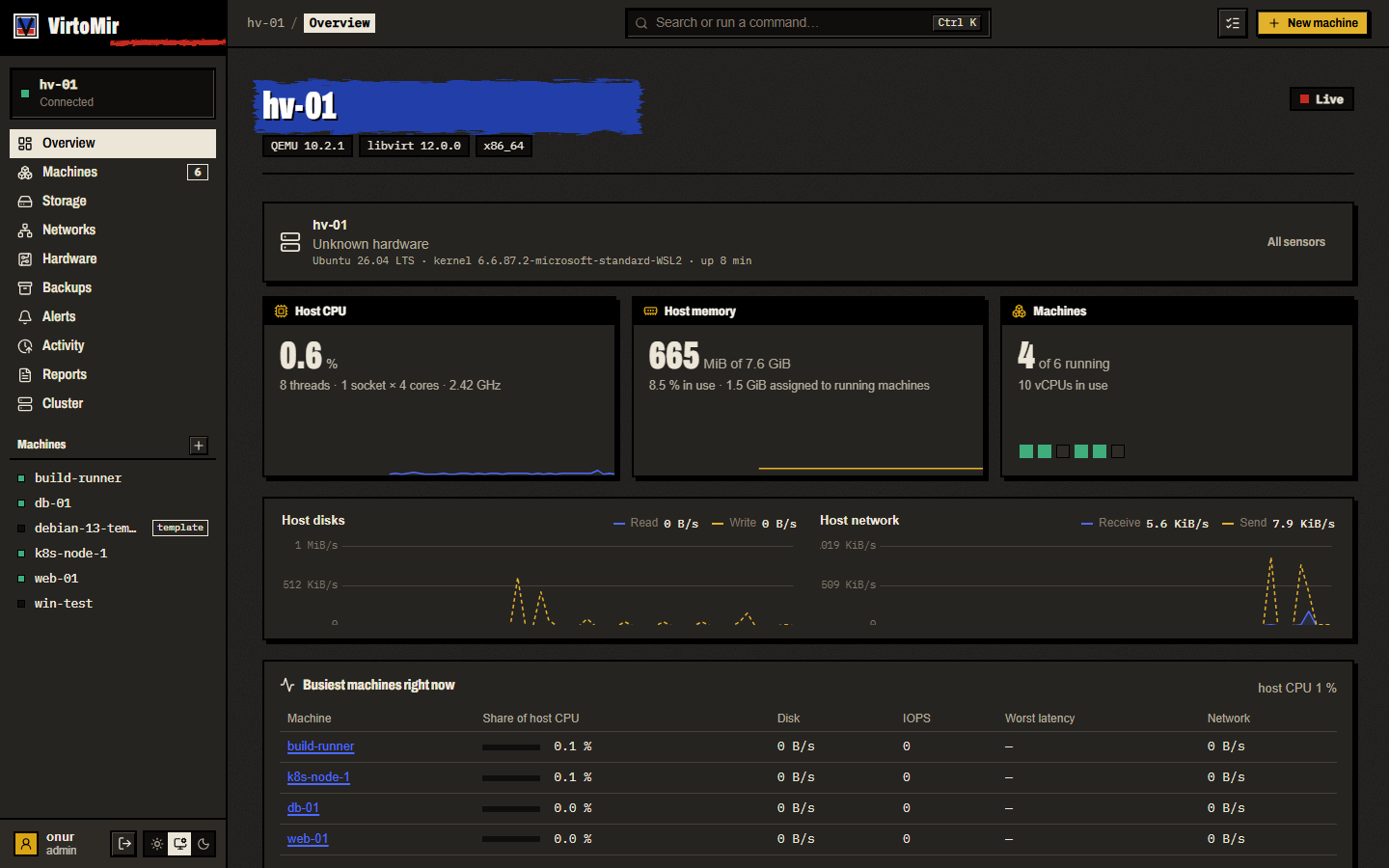
2. Why another one?
To be frank: most people don’t need VirtoMir to manage KVM. The ecosystem is crowded, and there are solid options.
| Tool | What | Strengths | Difference from VirtoMir |
|---|---|---|---|
| VMware vSphere (ESXi + vCenter) | Enterprise virtualization platform | The industry standard: vMotion, DRS, HA, vSAN, a wide ecosystem and support | Commercial and closed source. The licensing model changed after the Broadcom acquisition, and many organizations are looking for alternatives |
| Microsoft Hyper-V / Azure Local | Windows-based hypervisor | Deep integration with Windows and Active Directory | Tied to the Windows ecosystem, not KVM |
| Nutanix AHV | KVM-based hyper-converged platform | Mature HCI, central management with Prism, commercial support | Installs as its own software stack, commercial |
| Proxmox VE | Debian-based virtualization distribution (KVM + LXC) | Years in production, corosync-based clustering, HA, Ceph integration, Proxmox Backup Server, SDN, commercial support | It is the operating system. You don’t add it to a server; the server becomes Proxmox |
| Cockpit + cockpit-machines | libvirt plugin for the Linux server panel | Lightweight, ships with distributions, backed by Red Hat | Focused on basic settings. Advanced tuning needs virsh / XML. No multi-host, no HA |
| virt-manager | Desktop libvirt UI | Very detailed, mature | Desktop application, no web access |
| Incus (and LXD) | Manager for system containers and VMs | Mature clustering, a good API, a web UI | Doesn’t use libvirt; manages QEMU itself. It won’t see your existing libvirt machines |
| oVirt | Upstream of RHV, enterprise KVM management | Broad enterprise features | Red Hat has largely stepped back, development pace is low, heavy to install |
| Harvester | HCI on Kubernetes, KubeVirt and Longhorn | Cloud-native, backed by SUSE | Installs as its own OS, needs Kubernetes knowledge |
| XCP-ng + Xen Orchestra | Xen-based platform | Mature, commercial support available | Xen, not KVM |
| OpenStack, CloudStack, OpenNebula | Cloud orchestration | Large scale, multi-tenancy | Heavy for small setups |
| WebVirtCloud | Django-based libvirt web panel | Simple, can delegate VMs to users | Narrower feature set |
If you need Proxmox, use Proxmox. Replacing clustering and HA that have run in production for years with a project that is a week old makes no sense.
The gap VirtoMir tries to fill is narrow:
- You already run a Debian, Ubuntu or Fedora server and don’t want to reinstall it.
- You want an interface more detailed than Cockpit, like virt-manager but in the browser.
- You want to reach every libvirt setting, but also a simple path for a beginner.
The goal is “as easy as Cockpit, as thorough as raw libvirt XML”. Whether it gets there is for its users to say.
3. How it was built: one person and AI agents
I built VirtoMir together with AI coding agents. The README says so openly, and I want to go into a bit more detail here, because for anyone judging the code this is the most important fact.
How it works:
AGENTS.mdat the repository root is the entry point for agents: the code map, working rules, build and test commands. It is also the best map of the code for people.- Architecture decisions are kept as ADRs (Architecture Decision Records). Code comments refer to them as
ADR-00xx; 34 different ADR numbers appear in the code. - However, the ADRs, vision and session notes live in a local, gitignored
.ai/folder and are not published. That is a gap: you cannot read the reasoning behind anADR-0020reference from the outside.
The consequences cut both ways:
The good side: a scope that would take one person months could be attempted in a week. Tests were written at the same pace: about 748 Go test functions in 137 test files. CI runs go test -race, go vet, Svelte type checks, vitest and shellcheck on every push.
The side to be careful about:
- No person has reviewed all of the code line by line. I steered the design, made the decisions and tested it, but claiming I read each of 140k lines would not be honest.
- There are almost no
TODOorFIXMEmarkers in the code. For a hand-written project of this size that is unusual, and I think it says more about how the code was produced than about how finished it is. The gaps are not in comments; they are in this post and in the issues. - All tests are unit tests. There are no integration tests against a real libvirtd, QEMU, OVN, ZFS, BMC or vCenter (section 15).
So my advice to anyone reviewing it: go by the “not tested” and “missing” notes in this post, not by the feature list in the README.
4. Architecture
VirtoMir is a single Go process (virtomird) running as root. The Svelte 5 UI is embedded in the binary at build time (web/embed.go, //go:embed all:dist).
flowchart LR
    B[Browser<br/>Svelte 5 SPA] -- "HTTPS :8420<br/>REST + SSE + WebSocket" --> D

    subgraph H[Host]
        D[virtomird<br/>single Go binary, root] -- "libvirt RPC<br/>unix socket" --> L[libvirtd]
        L --> Q[QEMU/KVM processes]
        D -- "reads/writes" --> S[(/var/lib/virtomir<br/>JSON, JSONL, gob)]
        D -- "external tools" --> T[qemu-img, restic,<br/>tcpdump, virt-v2v, zfs ...]
    end

    D <-- "pinned TLS<br/>peer key" --> P[Other cluster members<br/>virtomird]
Key choices:
- It talks to libvirt in pure Go. Instead of cgo libvirt bindings it uses the
digitalocean/go-libvirtRPC library. The connection is opened over/var/run/libvirt/libvirt-sockand checked before every call; if it dropped, it reconnects. - No database. Each subsystem keeps its state in a JSON file under
-state-dir(default/var/lib/virtomir). The activity log is JSONL; metric history is gob. - Facts about a machine live in the machine. Whether a VM is a template, which template it came from, its owner and its project are stored in the
<metadata>section of its domain XML, under a VirtoMir namespace. That information travels withvirsh dumpxml, and there is no separate database to keep consistent. - The API is described by OpenAPI. There are about 326 routes (126 GET, 113 POST, 51 PUT, 36 DELETE). The OpenAPI 3.1 document is generated at runtime from the registered routes and served at
/api/v1/openapi.json.
At startup about 25 subsystems start inside the same process: the live metrics hub, alert engine, scheduler, cluster sync, HA manager, DRS, configuration history and so on. If most subsystems cannot read their state file, the daemon only logs a warning and carries on without that feature. Only authentication and TLS setup errors are fatal.
The design has costs too:
- Every feature lives in the same root process. A bug in one can affect all of them.
- Sessions, sign-in failure counters and the status of background jobs (clone, backup) are kept in memory. If the daemon restarts, everyone is signed out and the status of a running job is lost.
- Most state files are written atomically (temp file +
rename), but only some of them callfsync. There is also no lock file on the state directory, so nothing stops two daemons from sharing one.
5. Talking to libvirt: what “every setting is reachable” means
Every edit in VirtoMir follows the same cycle:
- Fetch the domain’s inactive XML with
DomainGetXMLDesc. - Decode it into Go structs with
libvirt.org/go/libvirtxml. - Change the structs.
- Encode back to XML.
- Define it with
DomainDefineXMLFlags(doc, DomainDefineValidate), so libvirt validates it against its own RNG schema.
The settings form is built on this cycle. The “review changes” step before saving runs the old and new XML through the same libvirtxml path and shows a line diff, so only real changes appear, not formatting noise.
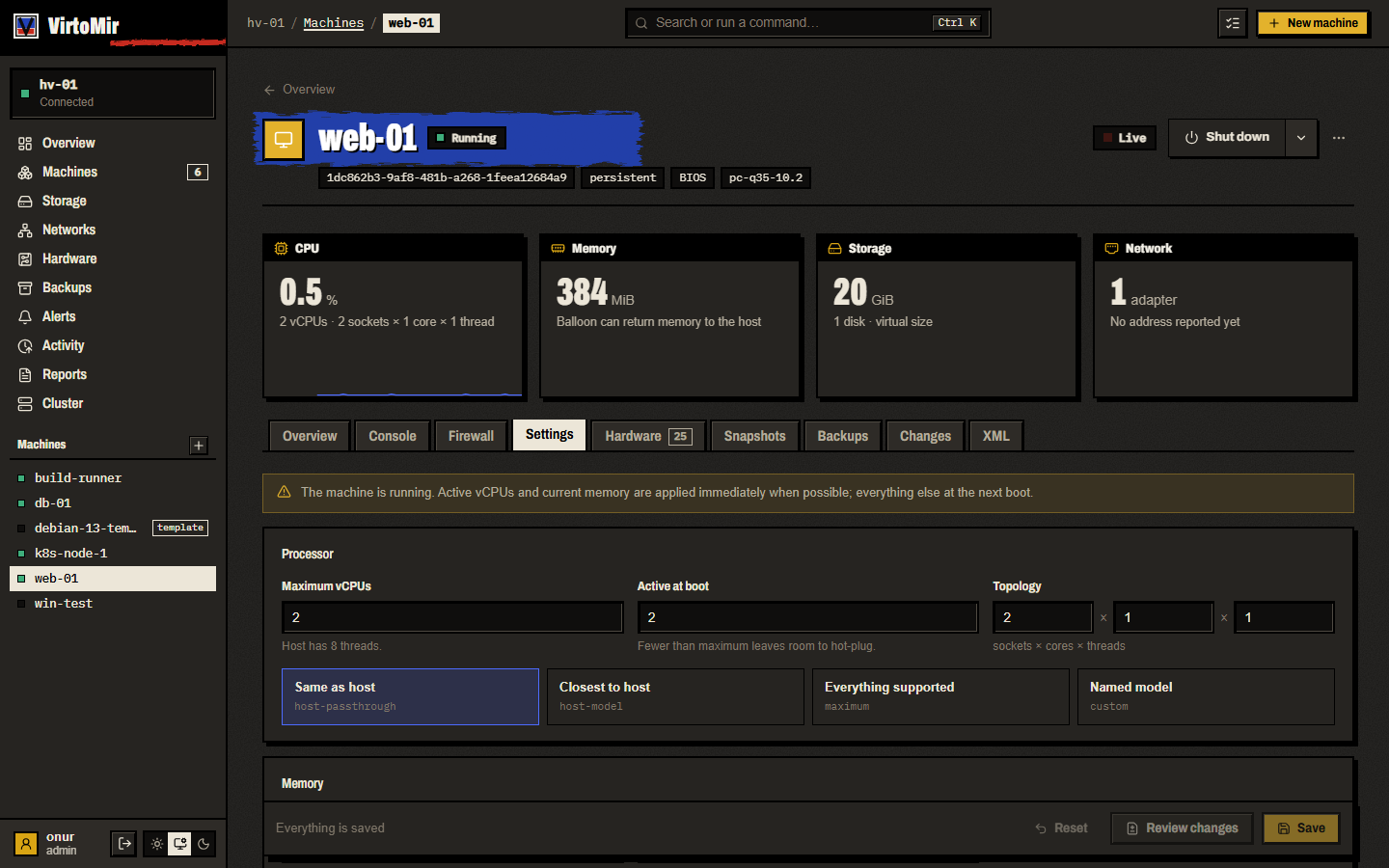
If the machine is running, the vCPU count (DomainSetVcpusFlags), balloon memory (DomainSetMemoryFlags) and scheduler parameters are applied live. Everything else takes effect at the next boot, and the UI says which is which.
One thing I shouldn’t overstate: the forms don’t cover every libvirt setting. Common settings have forms: CPU topology, memory, firmware, boot order, pinning, huge pages, NUMA, devices. For everything else the real escape hatch is the XML editor. It refuses a changed UUID or name and leaves the rest to libvirt’s validation. “Every setting is reachable” is true when you count the forms and the XML editor together.
Templates and linked clones. A linked clone is a qcow2 overlay volume whose backing store is the template’s disk (StorageVolCreateXML). Starting a template is blocked, and so is deleting a template that clones still depend on.
6. Live monitoring and metric history
Live data comes from a hub in internal/live:
- Once a second the hub reads host stats, the domain list and bulk domain stats. It also samples immediately when libvirt sends a lifecycle event (a machine started, stopped, crashed).
- CPU percentage is computed from counter deltas, per vCPU too. Host disk and network throughput come from
/proc/diskstatsand/proc/net/dev. - It reaches the browser over Server-Sent Events (SSE). A new client first gets the last 60 snapshots (one minute). A slow client skips stale frames and always sees the newest.
History doesn’t need Prometheus. Each series keeps four ring buffers:
| Step | Points | Span |
|---|---|---|
| 10 s | 2160 | 6 hours |
| 1 min | 1440 | 24 hours |
| 10 min | 1008 | 7 days |
| 1 hour | 720 | 30 days |
Values are stored as float32, about 21 KB per series. Missing points are NaN, so a stopped machine’s chart shows a gap, not zeros. History is written to history.gob every five minutes and on shutdown. That write does not fsync, so a sudden power loss can lose the last few minutes.
For Prometheus users there is a /api/v1/metrics endpoint too.
7. Configuration history
VirtoMir keeps every version of a machine’s definition, including changes made with virsh edit. Each version has a diff and can be restored with one click.
How it works, and its limits:
- Changes made through VirtoMir are recorded straight from the API, with who made them.
- To catch outside changes it uses polling, not libvirt events. Every 20 seconds it reads the inactive XML of every domain and compares it with the last saved version.
- As a result:
- Several outside changes within 20 seconds show up as one version.
- Who made a
virshchange is unknown. - Changes made only to the live definition are not seen.
- On a host with many VMs, reading every VM’s XML every 20 seconds is needless load.
- The last 100 versions per machine are kept.
8. Backups
Running machines are backed up with libvirt’s push-mode backup API (DomainBackupBegin), not blockcopy or external snapshots.
- If the guest agent is present, the filesystem is frozen first (
DomainFsfreeze) and thawed right after the job starts. - If every disk is qcow2, a libvirt checkpoint (dirty bitmap) is created. The next backup takes only the changed blocks and is linked to the previous one with
qemu-img rebase -u. A full backup is taken at regular intervals. - Stopped machines are copied with
qemu-img convert. - Off-site copies are sent with restic: S3-compatible storage, Backblaze B2, Azure, GCS, SFTP, a REST server or a disk. The chain is flattened before it is sent.
A detail I consider important for security: letting qemu-img guess a disk format in a process running as root is dangerous. A malicious image can name a file like /etc/shadow as its backing file. VirtoMir never lets qemu-img probe the format, and it rejects backing chains whose format isn’t recorded or that point outside the backup folder.
9. Console in the browser
- VNC: the daemon finds the VNC address or socket in the domain’s live XML and connects the browser’s WebSocket to it. The client side is noVNC.
- SPICE: for spice-html5, each SPICE channel gets its own WebSocket. The resolution follows the window, and with the guest agent the clipboard is shared.
- Serial console: opened with
DomainOpenConsoleBidirectionaland shown with xterm.js. It takes over an existingvirsh consolesession.
The console needs at least the operator role. When the session expires, an open console is closed within 30 seconds.
10. Several hosts
Clustering works without a separate database or a service like corosync. That makes it easy, and it also has weak points.
Joining
- An existing member makes a join code:
vmj1-+ base64url(address, TLS certificate fingerprint, a 16-byte one-time secret). The code is valid for 15 minutes and kept only in memory. - The new host connects to the member, pinning the fingerprint from the code, and sends its own details.
- The inviting member calls the new host back at the address and fingerprint it claims, uses up the secret, bumps the member list version by one and pushes the list to everyone.
Authentication between members
- Members pin each other’s TLS certificate by its SHA-256 fingerprint. CA validation is not used.
- Every request carries an
Authorization: VirtoMirPeer <nodeID>.<key>header. The other side stores only the hash of the key and compares in constant time.
Managing other hosts
The UI reaches another host through /api/v1/hosts/<id>/…. The host the user is signed in to authenticates and authorizes the request itself, then forwards it to the target member through a reverse proxy. REST, SSE and console WebSockets all take this path. The user name and role are passed in headers.
There is an important trust assumption here: the target member trusts the role the forwarding member vouches for. It does not re-authenticate the user. In other words, cluster members fully trust each other. One compromised member means admin on the whole cluster.
“The same settings on every host”
Each feature (DRS, placement rules, GPU pools, SDN, HA) has its own JSON file and an integer version number. Some changes are pushed right away. In addition, every member pulls state from the others every 60 seconds and takes the incoming state if its version number is higher.
This approach has a known weakness: conflict resolution is just “the higher version wins”. There are no vector clocks, no merging and no tie-breaker. If, during a network partition, two hosts change the same setting and both reach version N+1, neither will adopt the other’s state, and they stay silently different until the next change. On a small, stable network this is rare, but it should be known.
11. High availability (HA)
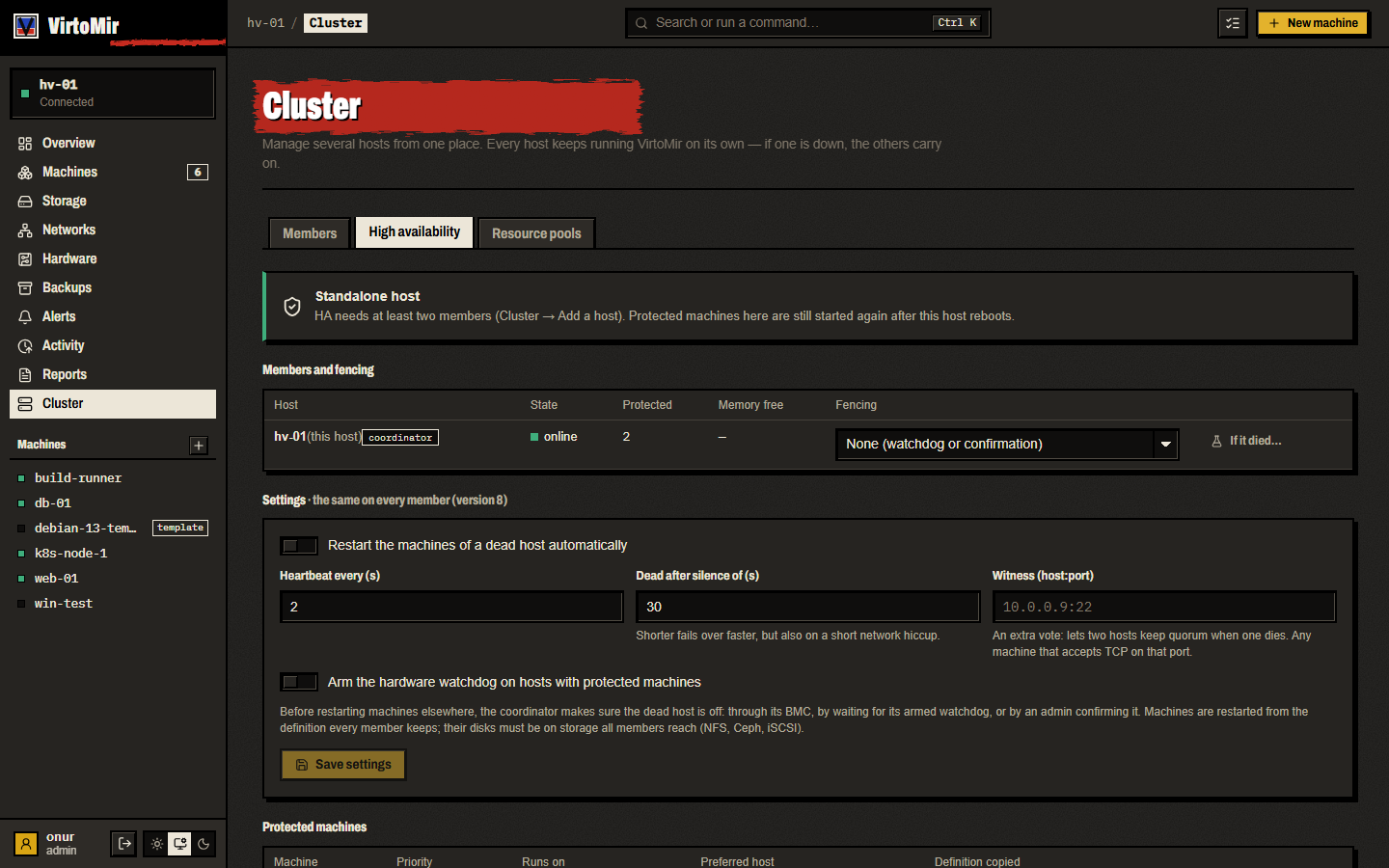
HA is the riskiest part of VirtoMir. It has never been tried on real BMC hardware. The description below is what the code tries to do, not how it behaves in the field.
How a host is declared dead
- By default every member sends a heartbeat to the others every 2 seconds.
- A host that hasn’t answered for the default 30 seconds is considered dead. The UI shows “suspect” after 3 missed heartbeats.
Quorum
votes    = this host + members that answered within the timeout (+1 if the witness is reachable)
total    = number of members (+1 if a witness is configured)
required = total / 2 + 1
- The witness can be any
host:portthat accepts a TCP connection (for example 22 for SSH). - A host that loses quorum immediately powers off its own protected machines (self-fence).
- The coordinator is the online member with the lowest ID.
Fencing
A dead host’s machines are not started elsewhere until it is certain the host is really off. These are tried in order:
- An admin confirmed in the UI that the host is off (refused if the host is still sending heartbeats).
- IPMI:
ipmitool -I lanplus … chassis power off. The password is passed in an environment variable, so it doesn’t show inps. - Redfish:
ComputerSystem.ResetwithForceOff. - For IPMI and Redfish, the fence only counts as successful once the BMC reports that power is off.
- If the dead host had a hardware watchdog (
/dev/watchdog) armed: the coordinator waits “last seen + failover timeout + watchdog timeout + 15 s” (about 105 seconds with defaults). The watchdog is only fed while the host is quorate, so a host that lost quorum reboots itself. - If none of these apply, it waits for an admin’s confirmation.
Once fencing succeeds, the coordinator starts the protected machines in priority order (critical, high, normal, low) on a member with enough free memory. Each member regularly copies the XML of its protected machines to the others, and every restart bumps an epoch number. A returning host that sees a higher-epoch copy running elsewhere powers off its own stale copy.
Known weaknesses
- There is no storage-level lock. No sanlock, no virtlockd, no SCSI reservation. The only thing that stops two copies writing the same NFS or RBD disk is fencing working correctly. I think this is the biggest difference from mature systems like Proxmox.
- A two-node cluster without a witness cannot survive a failure. Total 2, required 2. The surviving host has 1 vote, loses quorum and powers off its own protected machines too. If you run two nodes, a witness is mandatory.
- In a two-node cluster with a witness, if both sides still reach the witness, both can believe they are quorate. With IPMI/Redfish configured on both sides, they may try to power each other off. The watchdog path guards against this; the BMC path does not.
- BMC passwords sit in plain text in
ha.jsonon every member (file mode 0600). - Target selection checks only free memory, not CPU load or overcommit.
12. Live migration
VirtoMir uses libvirt’s client-managed v3 migration protocol. Each daemon talks only to the libvirtd on its own host and carries libvirt’s cookies between members over pinned HTTPS:
sequenceDiagram
    participant S as Source virtomird
    participant LS as Source libvirtd
    participant T as Target virtomird
    participant LT as Target libvirtd
    S->>LS: Begin3
    S->>T: POST /api/v1/migrate/prepare
    T->>LT: Prepare3
    S->>LS: Perform3 (QEMU → QEMU data stream)
    S->>T: POST /api/v1/migrate/finish
    T->>LT: Finish3
    S->>LS: Confirm3
- Flags:
Live,PersistDest,UndefineSource,ChangeProtection,AutoConverge; plusNonSharedDiskwhen disks must be copied. - On shared NFS disks are not copied. Otherwise they are copied live during the migration.
- For migration between different CPUs, it suggests a CPU model every host in the cluster supports (
ConnectBaselineHypervisorCPU).
An important gap: memory and disk data go from QEMU to QEMU over unencrypted TCP. libvirt’s TLS migration or tunnelling is not used. The control traffic is encrypted; the data traffic is not. Migration traffic must stay on a separate, trusted management network. This is one of the first things that should be fixed.
13. Other cluster features
I keep these short, because most are experimental:
- DRS: looks at the standard deviation of the hosts’ CPU and memory percentages. Above a threshold it suggests moving a machine from the busiest host to the least busy one, and in fully automated mode does it itself (every 5 minutes, with a 30-minute cooldown per machine). It is a simple heuristic: it doesn’t simulate whether the proposed move actually reduces the imbalance.
- Rolling upgrade: hosts go into maintenance one by one, machines are live-migrated away, VirtoMir (and optionally the OS packages) is updated, and the host comes back. A known gap: “maintenance mode” is only known inside the upgrade plan. DRS and HA don’t consider it, so machines can be placed back onto the host being upgraded.
- VXLAN overlay: one L2 network across several hosts, over the existing network on UDP 4789. Subnet, DHCP and NAT live only on the host that created the network. That host is a single point of failure, and nothing takes over from it. The underlay is unencrypted.
- SDN on OVN: VPCs, subnets, floating IPs, security groups, load balancers, IPsec. It has never run on a real OVN cluster. You have to set up OVN itself.
- ZFS replication: scheduled
zfs send -i | ssh … zfs receive. It uses plain SSH and accepts the host key on first connection. - Disaster recovery (DR): off by default (
-dr-experimental). The code says so plainly: the production host is not reached yet, so a real failover is always a forced one. It is not usable. - VMware import: reads a vCenter/ESXi inventory and converts machines with
virt-v2v. Never tried on real VMware hardware.
14. Security model
VirtoMir runs as root, because it needs the system libvirt socket and checks passwords through PAM. It is a root process that changes network settings, upgrades packages and runs tcpdump. That needs to be taken seriously.
What I think it does right:
- HTTPS by default (self-signed ECDSA certificate on first start, TLS 1.2 minimum).
- Sign-in with Linux accounts through PAM. Roles come from Linux groups: admin (
libvirt), operator, viewer. - LDAP / Active Directory and OpenID Connect (with state, PKCE and nonce). LDAP filters are escaped and plain
ldap://is refused. - Two-step sign-in with TOTP and recovery codes.
- Session cookie is
HttpOnlyandSameSite=Strict.Origin/Sec-Fetch-Sitechecks on requests that change things. - API tokens and cluster keys are stored only as hashes.
- The activity log is SHA-256 hash-chained and can be verified.
- Updates are downloaded from GitHub Releases and the signed SHA-256 file is checked against an embedded OpenPGP key. The apt/dnf repositories are signed too.
- Every libvirt definition is validated against libvirt’s schema.
What is missing or weak:
- No global CSP,
X-Frame-Optionsor HSTS header on the UI. - Authorization is done by string matching on the request path. Anything not listed defaults to admin, which is a good default, but keeping it correct by hand is fragile.
- Sign-in lockout is per IP. Behind a reverse proxy everyone comes from the same IP, so this can become a way to lock everyone out.
- Rate limiting applies only to the sign-in and 2FA endpoints.
- TOTP secrets are plain text on disk, with no protection against reusing the same code.
- The activity log hash chain has no key. Someone with root can change the file and recompute the chain.
- The signing key is in GitHub Actions secrets. Someone who takes over the GitHub account or CI could publish a validly signed update. Automatic installation is off by default, but the update check runs every 6 hours.
- The systemd sandbox is light (
NoNewPrivileges,PrivateTmp,ProtectHome=read-only). There is noProtectSystem, because the daemon writes netplan and NetworkManager configuration.
My advice: run VirtoMir only on a management network, or have it listen on 127.0.0.1 behind your own reverse proxy. Turn on two-step sign-in and give people the lowest role they need.
15. Tests and CI
- About 748 Go tests in 137 test files.
go test ./...runs anywhere, without libvirt. internal/virttests cover pure functions over libvirtxml structs and XML fixtures.- API tests use a fake backend. External tools (ipmitool, zfs, ovn-nbctl, ip, bridge) sit behind an interface; tests check which command would run without running it.
- An OpenAPI contract test calls every GET endpoint without parameters and checks that the answers match the schema.
- CI:
go vet,go test -race, a cgo build with PAM, Svelte type checks, vitest, shellcheck and the Terraform provider’s tests.
What’s missing:
- No integration tests against real libvirt. This is the biggest testing gap.
golangci-lint,govulncheck, CodeQL andnpm auditare not run in CI.- The OpenAPI contract test doesn’t cover POST/PUT requests or parameterized paths.
16. What it supports, and what it doesn’t
| Area | Status |
|---|---|
| Creating VMs, console, snapshots, backups on a single host | Tested on Ubuntu 26.04 and Debian 13 |
| Ubuntu 24.04, Fedora / RHEL 10, arm64 | Packages exist, no testers yet |
| Live migration and cold move in a small cluster | Tested. Migration data is unencrypted |
| HA (IPMI, Redfish, watchdog) | Never tried on a real BMC, no storage lock |
| Ceph RBD, iSCSI, LVM, ZFS pools | No testers yet |
| PCI/USB passthrough, vGPU, GPU pools | No testers with a real GPU yet |
| VXLAN overlay | Exists, single gateway, unencrypted |
| OVN SDN, IPsec | Experimental, never run on real OVN |
| DR (disaster recovery) | Experimental, off by default, not usable |
| VMware import | Experimental, never tried on real VMware |
| Confidential computing (SEV/SEV-SNP/TDX) | Offered when the host supports it, limited testing |
| LXC system containers | Exists, basic operations |
| Hyper-converged Ceph (like Proxmox) | No, on the roadmap |
| SR-IOV, BGP/EVPN, IPAM | No, on the roadmap |
| Fine-grained per-object permissions | No (roles, projects and quotas only) |
| Commercial support | No |
| Terraform provider, Ansible collection | Exist, early stage |
| UI language | English and Turkish |
The license is AGPL-3.0. Proxmox VE is AGPL-3.0 too. Contributions are accepted under a CLA, which keeps a commercial license without the AGPL’s obligations possible later. I want to state that openly rather than leave it as fine print.
17. Who should try it, and who shouldn’t
It makes sense to try if you:
- run KVM in a homelab and want virt-manager’s detail in the browser;
- know libvirt and are curious how a panel can be built on top of it;
- want to criticise the code, especially from a security angle.
It doesn’t make sense right now if you:
- need to rely on HA in production;
- want a hyper-converged cluster with Ceph — look at Proxmox or Harvester;
- need commercial support and a long-term maintenance commitment.
The safest way to try it is the online demo. It runs entirely in the browser against a pretend three-host cluster. One step further is a throwaway VM with one command:
git clone https://github.com/onurbaydas/VirtoMir && cd VirtoMir
sh dev/try/try.sh          # creates a throwaway Ubuntu VM with Multipass
sh dev/try/try.sh --delete # removes it when you're done
18. If you’d like to contribute
The project is developed in the open on GitHub. If you’re interested in virtualization, Go or Svelte and would like to contribute, I’d be glad. There are places one person can’t reach. The areas where it would matter most:
- Run it and tell me what breaks. Debian, Fedora, older Ubuntu releases, arm64. “It just worked” is a useful report too. Issue #1 is open for this.
- Review the security-sensitive code.
internal/authandinternal/api. Please report problems privately, not in a public issue. - Test the paths I can’t reach. HA with real BMCs, Ceph, GPU passthrough, VMware.
- Criticise it. The code and the idea. I already know some of the gaps in this post; I want to hear about the ones I don’t.
- Contribute code. Start with a good first issue. The gaps in this post are good starting points too: TLS migration, a storage lock (virtlockd/sanlock), configuration history from libvirt events, CSP headers, integration tests.
Ideas and questions: GitHub Discussions.
19. Conclusion
VirtoMir is one answer to the question “how far can one person get in a week with AI agents?”. In scope, very far. In maturity, not far. Maturity comes from real hardware, real users and time.
So I wrote this post as an invitation, not an announcement. I tried to be as clear as I could about how the code works, where it is weak and what has not been tested. If I got something wrong or left something out, I want to hear that too.
References
- VirtoMir source code: https://github.com/onurbaydas/VirtoMir
- Online demo: https://onurbaydas.github.io/VirtoMir/demo/
- Try it in a throwaway VM: https://github.com/onurbaydas/VirtoMir/blob/main/docs/try-in-a-vm.md
- Security policy: https://github.com/onurbaydas/VirtoMir/blob/main/SECURITY.md
- libvirt domain XML format: https://libvirt.org/formatdomain.html
- libvirt backup API and checkpoints: https://libvirt.org/kbase/incrementalbackupinternals.html
- libvirt migration documentation: https://libvirt.org/migration.html
- go-libvirt: https://github.com/digitalocean/go-libvirt
- libvirtxml: https://pkg.go.dev/libvirt.org/go/libvirtxml
- Proxmox VE: https://www.proxmox.com/en/products/proxmox-virtual-environment/overview
- Cockpit: https://cockpit-project.org/
- Incus: https://linuxcontainers.org/incus/
- oVirt: https://www.ovirt.org/
- Harvester: https://harvesterhci.io/
- XCP-ng: https://xcp-ng.org/
- WebVirtCloud: https://github.com/retspen/webvirtcloud